How to search in the Image Tab?
How to search PDFs in the Image Tab?

The PDF indexing configurations must be enabled for this search to work properly on the Image tab and Image search screens.
There are a few ways to find specific information while using the PDF content search:
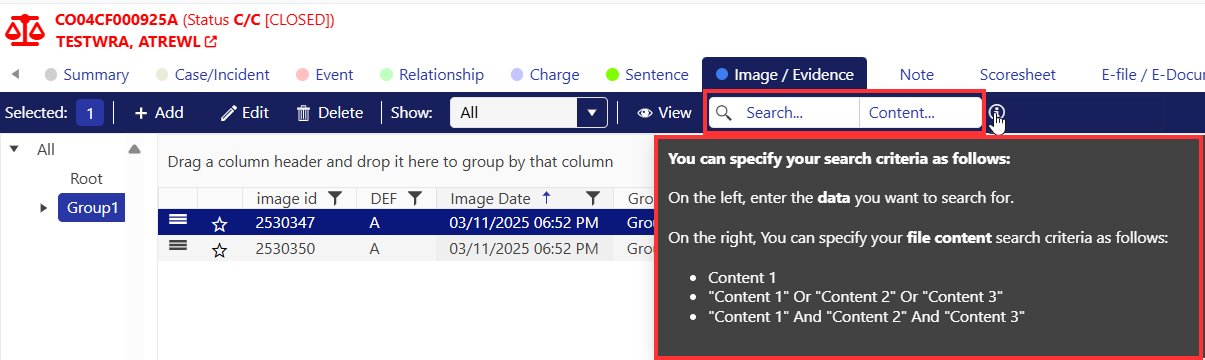
When searching for a single word, users can simply type the word they are looking for, without using the double quotes. It is important to know that capitalization does not affect the results of the search.
When searching for multiple words users have the option to search using AND or OR to join the words. When searching multiple words, users MUST use the double quotes around each word!
When searching for multiple words in the document where we want both or all words in it, we would use AND.
When searching for multiple words in the document where we want to find either words in it, we would use OR.

To stop using the Pdf indexing and have the ability to see all the documents and images again. A user will need to manually clear the search bar and search again. This will bring back all the documents and images back to the image tab.
Word documents do not get indexed by the pdf indexing tool, users must save the document as a PDF to be indexed by the tool and be able to search via the content.
How to use the OCR?
OCR stands for Optical Character Recognition. This allows users to search most documents in the image tab by a name or specific word.
STAC can OCR embedded images/PDFs that contain typed, handwritten or printed text and extract their content.
Once the configuration has been enabled by the administrator and an image is uploaded, STAC will automatically schedule the OCR process for any images with the extension type (jpg,jpeg,png,bmp,tif,pdf) and extract their content.
Use the search bar on the top right of the toolbar to search for content using OCR. The documents that have the searched content will populate in the Image tab
Related Articles
How to redact a PDF?
What is a document redaction? Document redaction is the process of modifying a document to conceal or obscure sensitive information, ensuring it's not visible to unauthorized individuals. It's a crucial step in protecting privacy and complying with ...What is the Image Tab?
What is the Image Tab? The Image tab is where users are able to store and organize the images, evidence, PDFs, and documents from the case. The image tab is organized with the folders on the left, then the image details that can be viewed as details ...Frequently Asked Questions
Bookmarks What tabs are able to be bookmarked? Users are able to bookmark items from: Event Tab Image Tab Note Tab Relationship tab Image Review Screen CIP Cloud Storage Can users use the OCR or PDF indexing on images that are in CIP Storage? If ...What is the Image Search?
What is the Image Search? The image search is a tool used to easily search for images in any case. This is useful when users are searching for an image but are not sure what case the image was related to. Users can use one or many filters to find the ...How to use the Image Review?
What is the Image Review? The image review is a great tool to see all the images that are pending review. By default, STAC will show the images for the user that is logged in and any images that they are assigned to review. A user will be notified ...