How to request assistance for a STAC Upgrade?

Do not update the production environment without first updating the test environment. Not only is this the best practice, but all agencies running STAC have agreed to update the test first as part of the license agreement.
Requirements for CIP to assist on Upgrading STAC
1. Please be sure to request after hour and general upgrade support at least 24 hours before the upgrade will be taking place.
2. CIP does not do same day Test and Production updates. We require at least 24 hours after upgrading the Test environment to ensure the agency has plenty of time to test the Test environment before CIP will update the Production environment.
How to submit a ticket to request CIP to run a STAC upgrade?
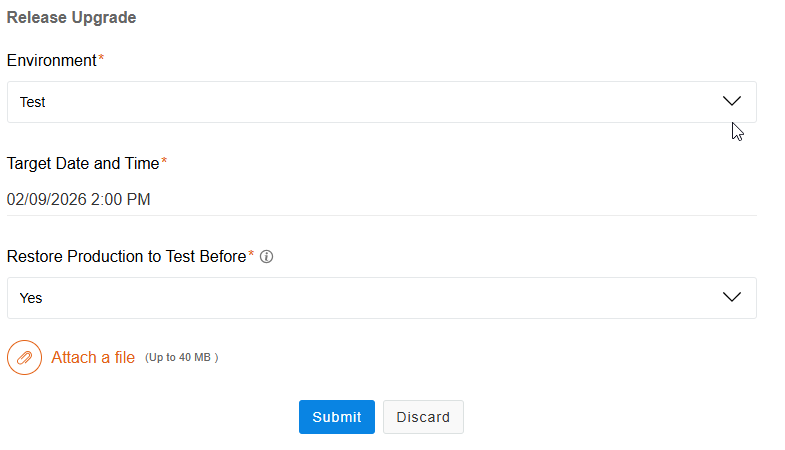
If an agency needs CIP to do a STAC upgrade, please send a ticket with the Classification= Release Upgrade.
This classification will open more required fields in order for us to better assist:
1. Environment (Test or Production)
This classification will open more required fields in order for us to better assist:
1. Environment (Test or Production)
2. Target Date and Time
3. Restore Production to Test before (Yes or No) (This only applies if the agency is upgrading the Test Environment)
Related Articles
Support Availability for STAC 3
Support hours CIP provides support services from 9:00 a.m. to 5:00 p.m. Eastern Time, Monday through Friday, excluding recognized holidays. After-hours support is available by prior arrangement and will be billed at the after-hours rate. After Hours ...How to use Beyond Trust Remote Support?
What is Beyond Trust Remote Support? Beyond Trust Remote Support is a secure software solution that allows IT professionals to remotely access and control any computer or mobile device, regardless of its location or network. Why CIP uses this ...How to submit a ticket?
How can I submit a support ticket? Tickets should be submitted through the Helpdesk website https://stac.helpdesk.cipi.net/. Users can also email: stac.helpdesk@cipi.net What information should be included when submitting a ticket? When submitting a ...